Run the company
Dashboard
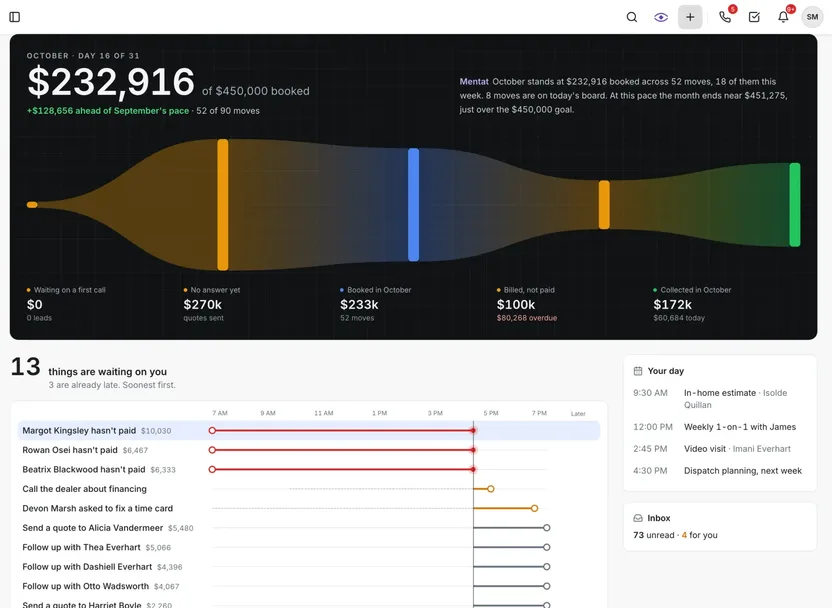
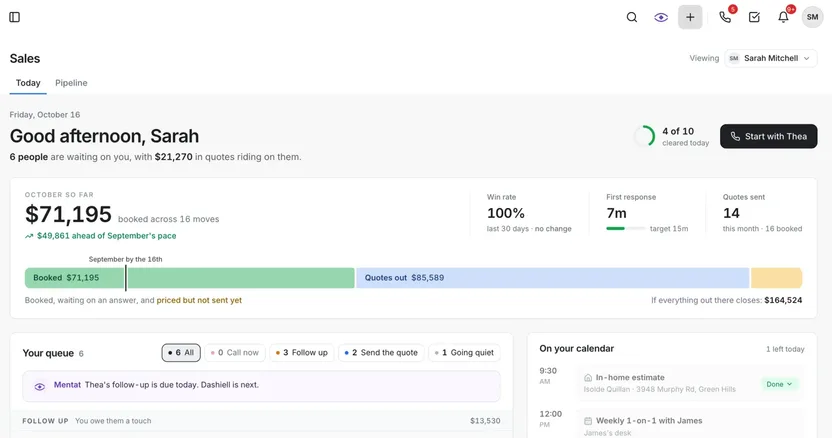
The owner’s morning on one screen: the month against its goal, what is waiting on you, and what Mentat makes of it.
The month against goalBooked so far against the goal, with the pace compared to last month.
The riverQuotes sent, booked, billed and collected in one line.
Waiting on youOverdue invoices, tasks, time card fixes, follow-ups and time off, laid out on today’s clock.
Mentat reads the monthA line beside the numbers reads the month back and says where it will end.
Run the company
Money
See what a job made and what the company kept. Invoices and payments post to QuickBooks Online, Stripe takes the cards, and payroll stays in Gusto.
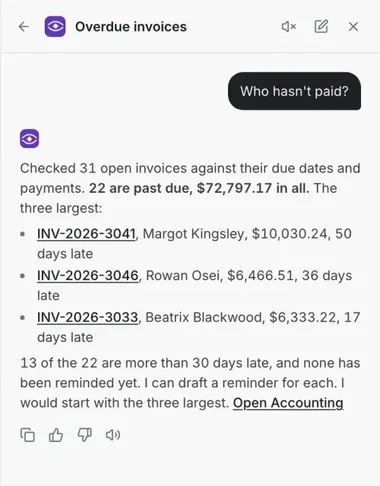
Ask Mentat who has not paidMentat checks the open invoices and answers in a line, then lists the largest with invoice numbers, amounts and days late. It offers to draft a reminder for each.
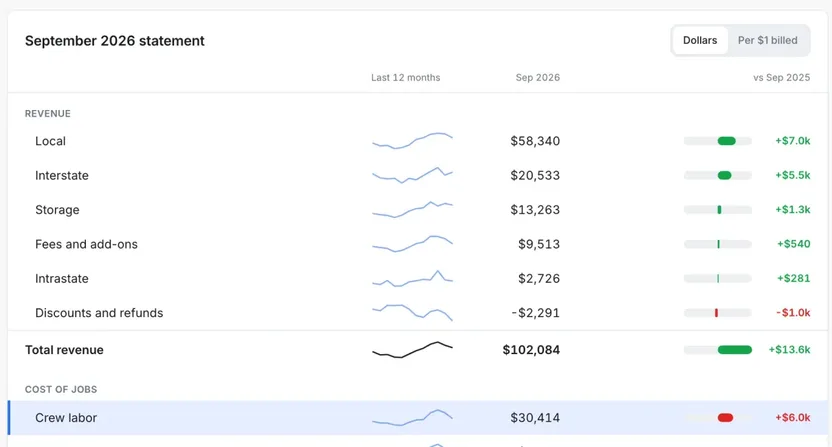
A profit walkProfit against the same month a year ago, drawn as a waterfall of what moved it.
Profit and lossWhat you kept from every dollar billed, then the statement by line with a trend for each.
Crew labor on topCost of jobs is broken out with crew labor first.
QuickBooks OnlineCustomers, invoices and payments post to QuickBooks.
StripeCards, payment links and tap to pay.
Gusto staysPayroll stays in Gusto.
Win the work
Phones and Mentat
Every call, text and email lands on the customer’s record. When nobody can pick up, Mentat, the AI assistant, answers, says it is an AI, and opens the lead.
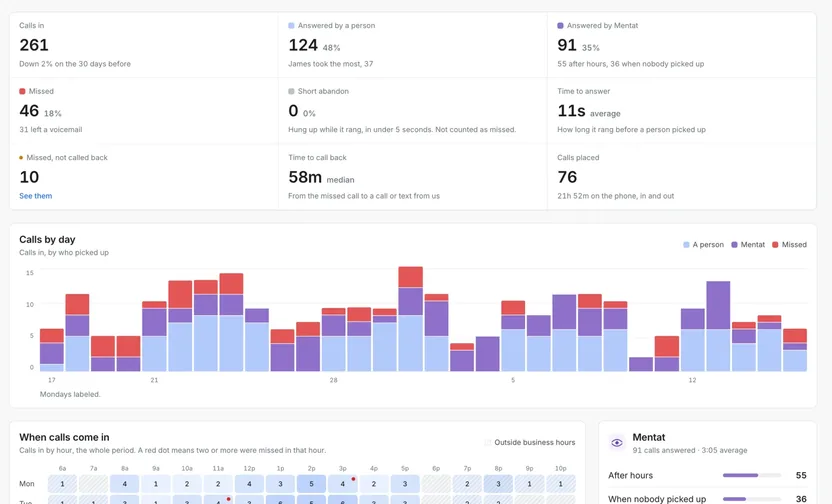
Calls reportThirty days of calls, split into answered by a person, answered by Mentat and missed.
Missed and not called backMissed calls nobody returned are counted, so somebody returns them.
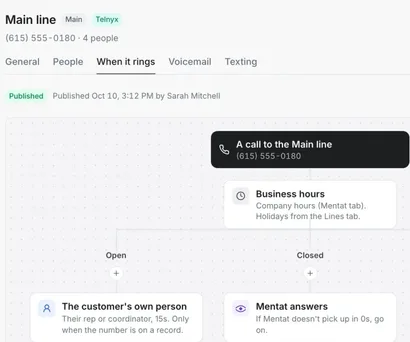
A call flow you drawSet who rings, in what order and for how long, for open hours, closed hours and holidays.
After hoursMentat picks up when nobody does, and opens a lead for the caller.
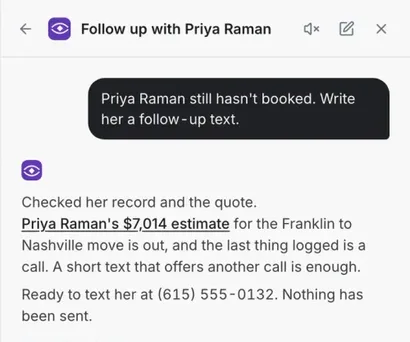
Suggestions you approveMentat shows the exact text it wants to send and waits for you to press Do it.
Texting built inCalls and texts are logged on the lead, so the record is complete.
Win the work
One Inbox
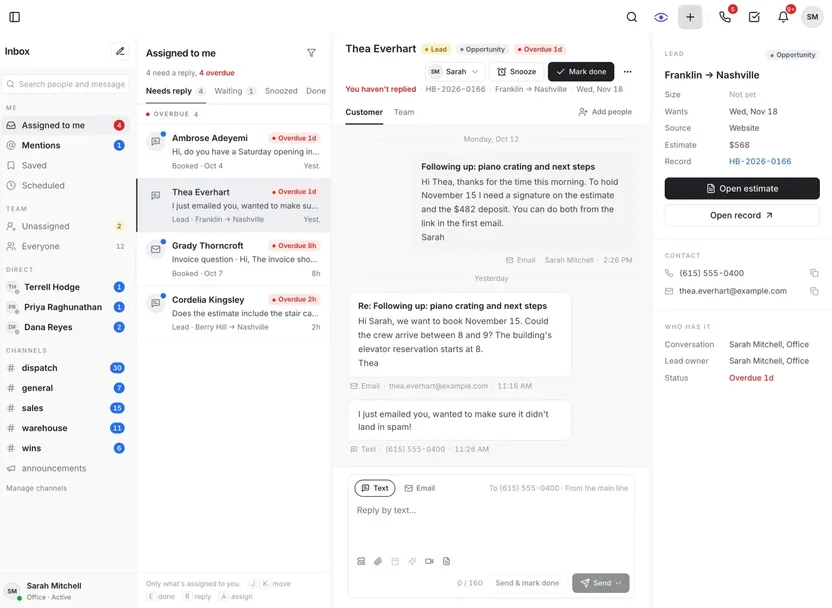
A text and emails with the same person sit in one thread. You see who sent each one and who has the conversation.
One thread per customerTexts and emails with the same person stay together.
The record beside itThe lead’s route, estimate and record link sit on the right of the thread.
Who has itEach conversation shows who has it.
Reply either wayText and Email reply tabs sit under the thread.
Win the work
Sales
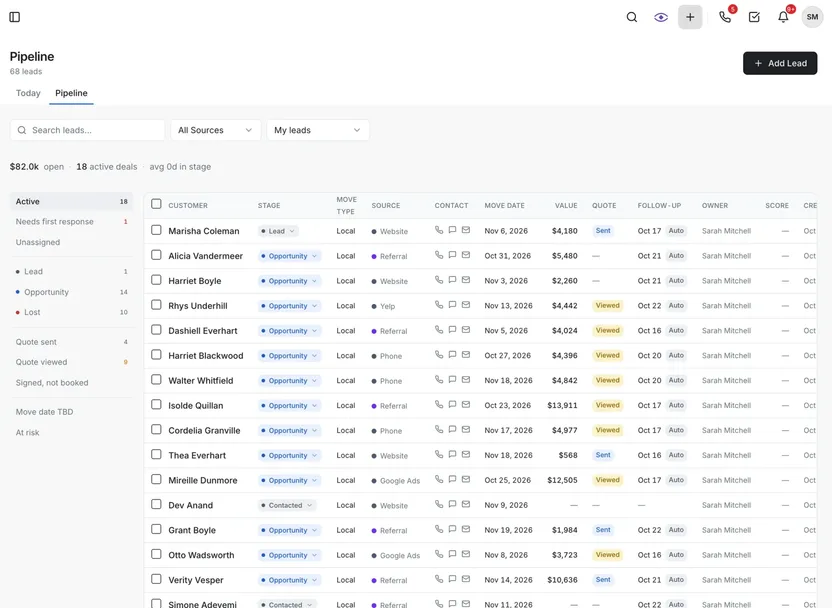
Every lead, what it’s worth, who owns it and whether the quote got an answer. Each rep gets a home of their own.
Stage and quote, apartWhere the lead is and where its quote is are separate columns.
A home for each repBooked this month, quotes out waiting on an answer, win rate and first response time.
An open items queueLeads needing a first response, quotes opened but never answered, follow-ups due.
Activity countedCalls, texts, emails and quotes sent, shown beside the results.
Win the work
Estimates and visual inventory
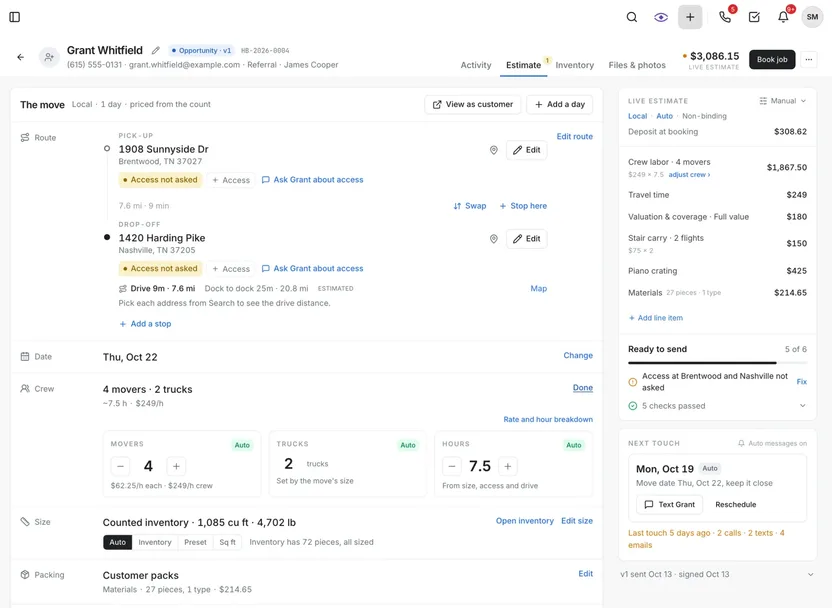
Build the price with movers, trucks and hours as three steppers, with the live line items beside it. Customers send a video, and the items are read from it.
Crew in three steppersMovers, trucks and hours are marked Auto, with the rate and hour breakdown linked.
The total stays in viewThe header band carries the total and the Book job button.
A ready-to-send checkA short check runs before the estimate goes out.
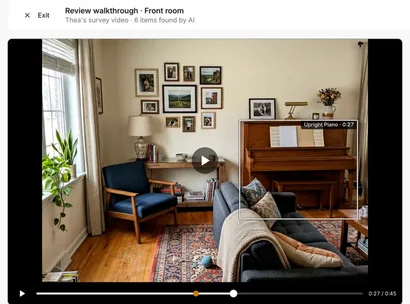
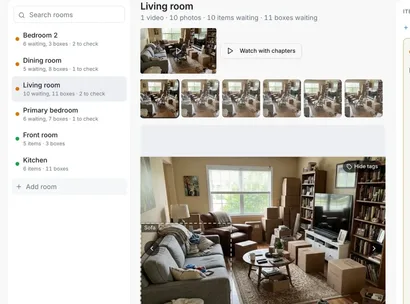
Rooms from the videoEach room is read from the customer’s video, with stills you can check.
One item at a timeItems are boxed on the video with the customer’s own words, like the piano at 0:27.
Staying items not countedA sofa the customer said is not going is marked Staying, then one button applies the rest.
Run the day
Dispatch and fleet
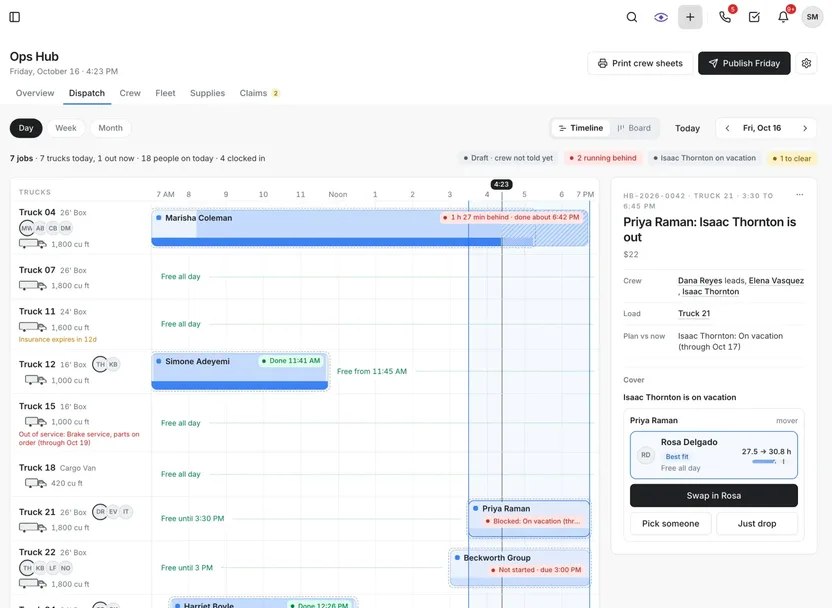
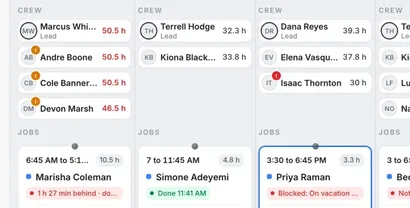
Every truck, crew and job for the day on one board, with the week’s hours beside each name. Fleet keeps the trucks themselves in the same place.
A day timelineThe day’s jobs by truck, with what is done, on time or still ahead.
Hours beside namesEach person’s hours for the week sit by their name, and anyone over 40 is marked.
Blocked jobs say whyWhen a mover is on vacation the board suggests cover: Swap in, Pick someone or Just drop.
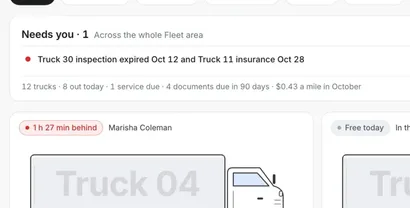
A card for each truckStatus today, mileage and next service.
Needs youExpired inspections and insurance dates come up in one line at the top.
Cost per mileFuel economy, service schedule and documents for each truck.
Run the day
Calendar
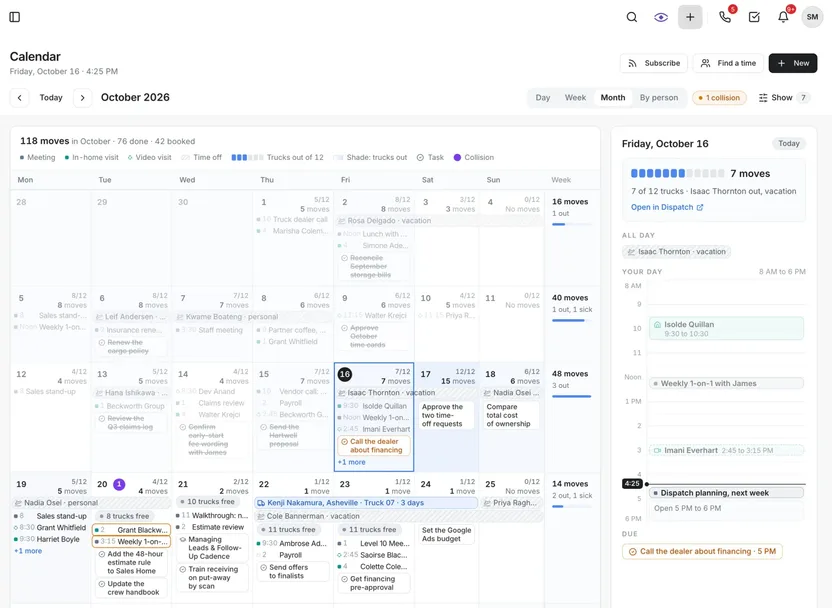
Every move, estimate visit, meeting, task and day off on one company calendar. Trucks free on each day show on the date.
Trucks free, by dayEach day shows how many trucks are still free.
Collisions flaggedA chip counts the collisions, and pins mark the days they fall.
A panel for the dayPick a day for its moves, the trucks out and its own hours.
Google CalendarConnects to Google Calendar.
Run the day
The crew app
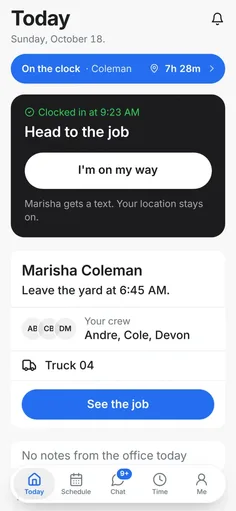
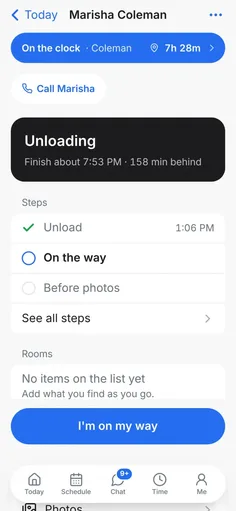
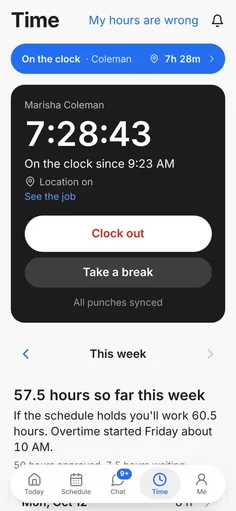
The crew lead runs the day from the phone, one next step at a time. The clock, the checklist and the customer are on the same screens.
TodayWhen to leave the yard, the rest of the crew, the truck and the job on one screen.
I’m on my wayOne button texts the customer.
The job screenA short checklist, the next step in bold and a Call button for the customer.
Running behindA card shows the expected finish and how far behind the crew is.
TimeClock out and take a break, with the week in plain words and overtime shown.
My hours are wrongA button at the top of the Time screen starts a correction.
Run the day
Storage and warehouse
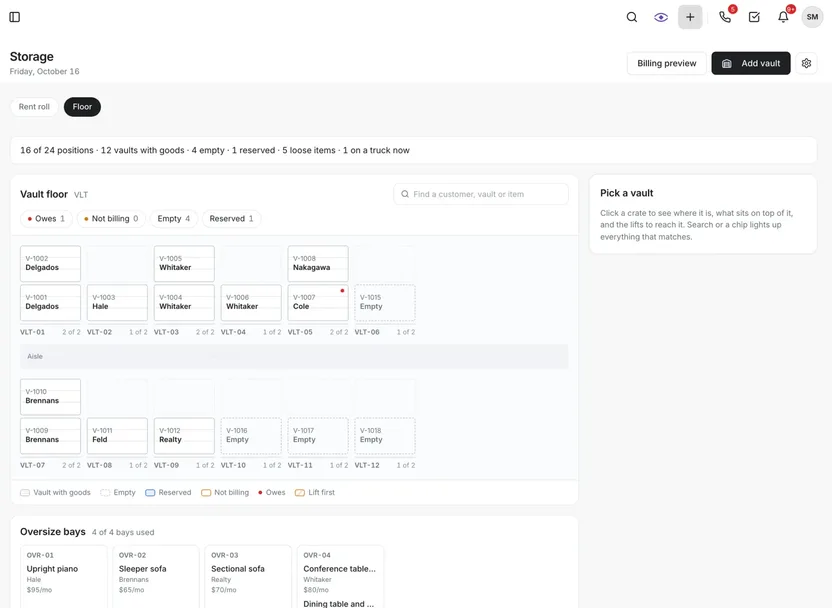
Know what is in every vault and bay, who it belongs to, and who owes. Every vault and bay is drawn on a floor map.
The floorVaults in rows of footprints, stacked by tier and named for the customer.
Who owesA red dot marks a vault whose account owes.
Oversize baysLoose items sit in oversize bays with their monthly fees.
Counts at a glancePositions used, vaults with goods, empty, reserved and loose items.
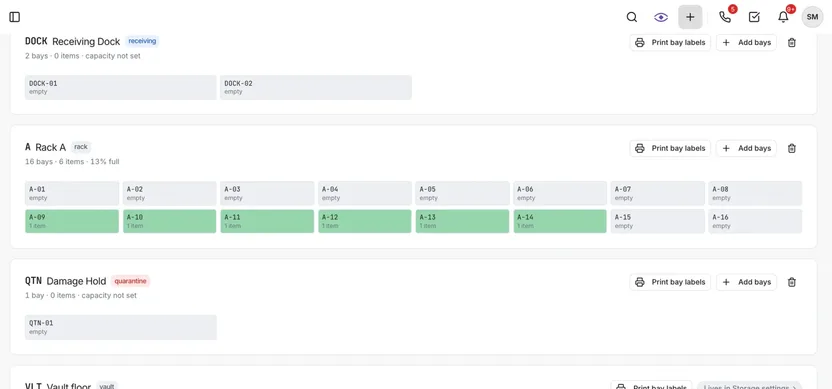
Warehouse layoutZones are grids of numbered bays, each showing what is in it.
Labels and baysPrint bay labels and add bays from the same screen.
At the demoBuilt and running today. Bryce shows these on the demo.
Also built, shown on the demo
Seven more modules, each on the same customer record as everything above.
- MarketingWhere your leads come from, and which sources turn into booked moves.
- PartnersThe realtors and other businesses that send you work, in one place.
- Ops HubThe workbench for whoever runs operations: today’s dispatch, crew, trucks, supplies and open claims in one place.
- People and HRTime cards, time off and pay rates for the crew and the office.
- Coaching and EOSEOS is a weekly meeting routine many small companies run on. Meetings, targets and the scorecard live here.
- WorkspaceEach person’s own to-dos, reminders and notes.
- SettingsPhone lines and when they ring, who can see what, and what runs on its own.